Keyflow brings desktop-style motion tools to Android creators
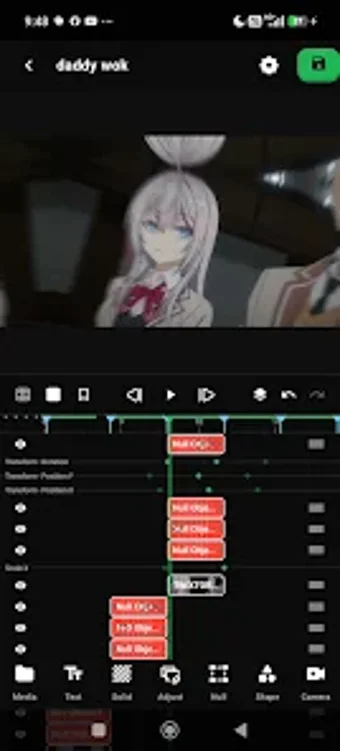
Build multi-layer motion pieces with precise keyframes, a 3D camera, and custom expressions on a mobile device. Keyflow, from Angkin, packages a layer-and-group timeline, advanced easing curves, and Twixtor-style frame interpolation into an Android multimedia app. It targets creators who have outgrown preset-driven editors and need manual control for cinematic clips, motion graphics, or social-format compositions across custom aspect ratios.

Unlock your creativity with Adobe Stock
Get 10 images or 1 video with a free trial
What Keyflow does for mobile motion projects
Keyflow performs detailed clip-and-composition work on-device by combining a multi-layer timeline with group management and null objects, letting you arrange video, photo, text, and audio in hierarchical tracks. The app supports procedural motion through custom expressions, so you can script repetitive or generative animations that would otherwise require desktop motion tools.
What file and export flexibility you get
The app lets you create projects in any aspect ratio and export them for social or professional delivery. Its inclusion of Twixtor-style frame interpolation and motion blur affects final output quality by producing smoother slow-motion and movement-aware blurring during render, which directly changes perceived frame fidelity at export time.
How the interface supports complex animation workflows
The timeline exposes advanced keyframe animation with customizable easing curves and time remapping, so you can place precise timing and speed ramps inside a mobile session. Layer grouping and a 3D camera system let you stage spatial compositions, and the presence of expressions provides a mechanism for procedural control without repeated manual keyframing.
Performance and who benefits from the app
Advanced features such as 3D rendering and high-quality frame interpolation depend on device hardware, which makes the app most useful to creators on higher-performance Android devices. Motion designers, social creators needing cinematic slow motion, and hobbyists comfortable with manual animation controls get the most from the app's toolset.
A practical gateway to desktop-style motion on mobile
You should consider the app if you need manual, layer-based control and procedural animation on Android; its desktop-class keyframing, 3D camera, and expression support let you build complex sequences without leaving your device. Expect device-dependent performance for heavy 3D or interpolation tasks, so use a higher-performance device for demanding projects. For creators hesitant to move from presets, Keyflow acts as a capable entry point to manual motion work.